
Overview
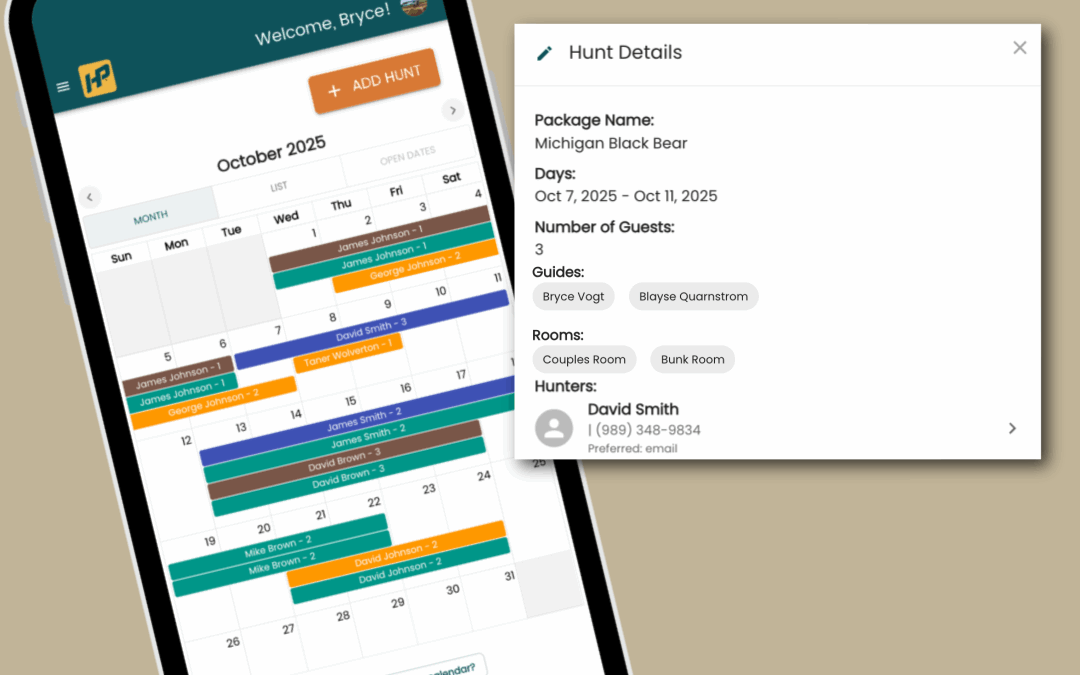
The HuntPay Calendar is your central hub for managing hunts, guiding schedules, and client bookings – all in one easy-to-use view. Designed specifically for outfitters and guides, the calendar helps you keep track of availability, confirm hunts, and avoid double-bookings so you can focus on what matters most: delivering great outdoor experiences.
With the HuntPay Calendar, you can:
- View All Bookings at a Glance – See upcoming hunts, deposits, and client details in a single dashboard.
- Manage Availability – Block off dates when you’re unavailable and highlight open spots to attract more bookings.
- Sync Across Devices – Access your calendar on desktop, tablet, or mobile for real-time updates, wherever you are.
- Stay Organized – Color-code events, group bookings, filter by lodge or hunt type, or quickly search for specific clients or trips.
- Automate Scheduling – New bookings made through HuntPay are automatically added to your calendar.
The Calendar is fully integrated with HuntPay’s payment system, so you can connect schedules with deposits, balances, and payment reminders – keeping everything streamlined for you and your clients.
Topics + Help Guides
Many new outfitters try to offer “everything to everyone,” but that leads to weak marketing, unclear pricing, and missed bookings.
1. Getting Started with the Calendar
Learn how to navigate the HuntPay Calendar, adjust your view (daily, weekly, monthly), and understand the color-coding system.
Onboarding: Getting Started with the Calendar
2. Adding and Editing Bookings
Step-by-step instructions for adding new hunts, updating existing bookings, and attaching client details.
Guide: Adding and Editing Bookings
3. Blocking Off Dates
How to mark dates unavailable so clients don’t book over those dates.
4. Managing Availability
Tips for keeping your open dates clear, visible, and easy to manage so you can maximize bookings.
5. Automatic Booking Integration
See how new client reservations flow directly into your calendar with payment details attached.
Guide: Automatic Booking Integration
6. Filtering and Searching Your Calendar
Find specific hunts by client name, hunt type, or location. Learn to filter views to quickly see what matters most.
Guide: Filtering and Searching Your Calendar
7. Best Practices for Staying Organized
Pro tips for outfitters: color-coding hunts, managing multiple guides, and reducing scheduling conflicts.
Guide: Best Practices for Staying Organized
8. Troubleshooting Calendar Issues
Common fixes if your calendar isn’t syncing, bookings don’t show, or availability looks off.
Want to Learn More?
Follow HuntPay for guides on outfitter marketing, booking automation, and business growth strategies built for the hunting industry.